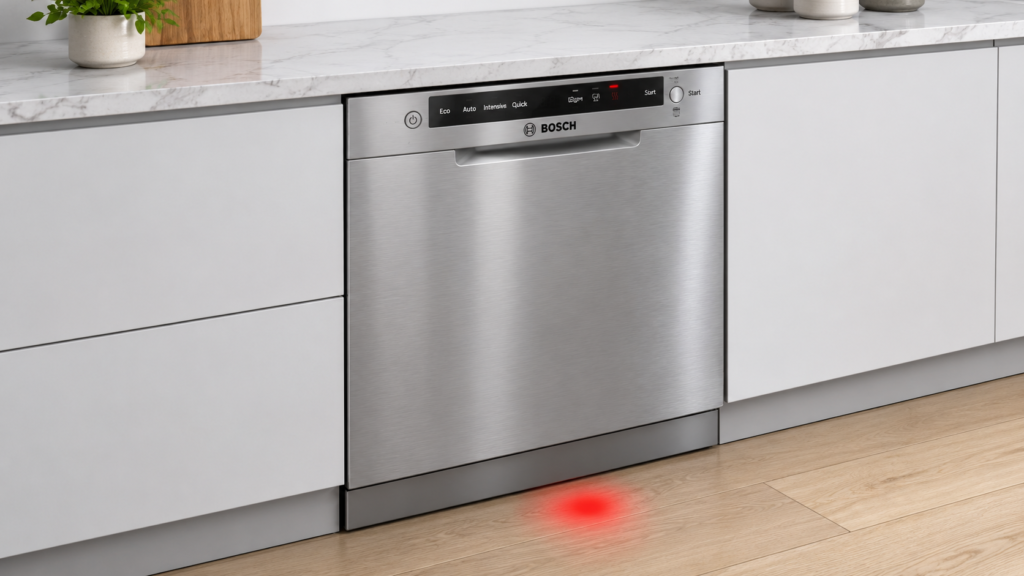
On most Bosch dishwashers that have it, a flashing red light on the floor means the door is not fully closed. The red light is called InfoLight. It stays steady while a cycle runs. Bosch’s operating instructions say it flashes when the door is not completely closed. Start there: push the door shut until the latch clicks.
Bosch’s US support page also says a blinking floor light signals a problem. If the door is shut and the light still flashes, work through the checks below. They are in order, safest first.
What the light normally does
During a wash cycle, InfoLight projects a light spot on the floor under the door. Bosch’s manuals say not to open the door until the spot disappears. Bosch’s US error-code page describes it as a red floor light that shows the dishwasher is running.
Not every Bosch dishwasher behaves this way:
- InfoLight is marked as a feature that depends on the model in Bosch’s manuals.
- The spot is not visible if the dishwasher is installed at eye level behind a flush cabinet front.
- You can switch InfoLight on or off in the settings, so a missing light does not always mean a fault.
- Some Bosch manuals do not describe the floor light flashing at all. For example, the SHX65DM5N manual mentions the floor light only as a signal that the cycle is running.
If your dishwasher has no floor light, this article may not apply. Check your own manual using the model number on the label on the edge of the door.
Step 1: Close the door fully
A door that is closed but not latched is the most common reason. Bosch manuals such as the SHSM63, SHS863 and SHS843 series instructions say to close the door until the latch clicks.
Caution: if the cycle is running or has just finished, hot water or steam can escape when you open the door. Wait until the water noises stop and the steam clears before opening it fully. If you interrupted a heated cycle, pressure can push the door open, so close it gently.
Check what is stopping the door
If the door will not latch, look for:
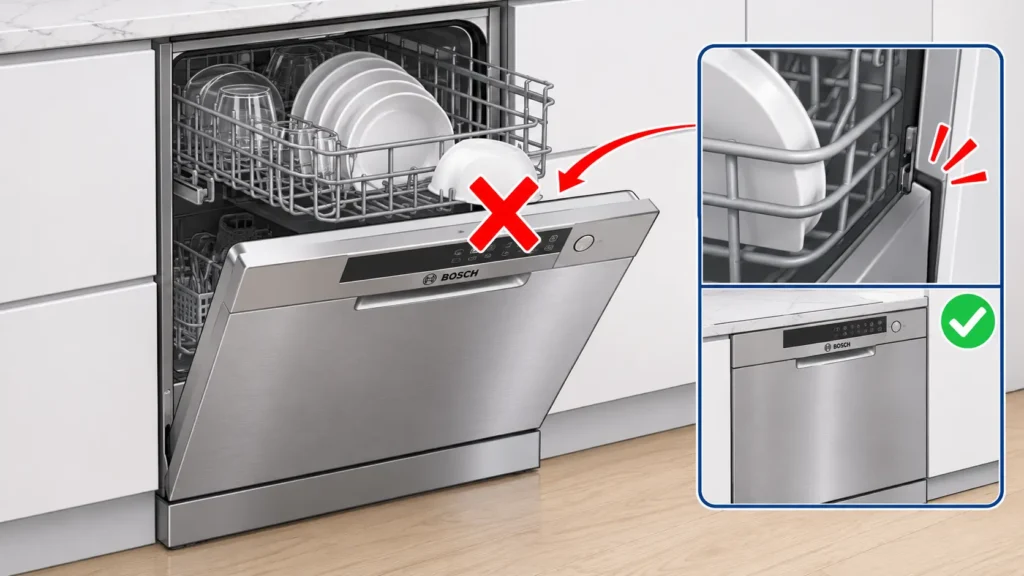
- The upper rack or its handle. The SHE89PW55N, SHX89PW55N and SHV89PW53N manual says items in the upper rack handle tray can stop the door closing fully. Another Bosch manual says the top basket can press against the door.
- An activated door lock. Some manuals list “door lock has been activated” as a cause when the door cannot be closed. Their remedy is to close the door with more force.
- Loose or protruding items. Push anything sticking out of the racks back in.
Step 2: Press Start and close the door within 4 seconds
Bosch dishwashers have protection against unintentional operation. After you press Start, the door must close within 4 seconds or the cycle pauses. The control panel then prompts you to press Start again and close the door. This feature cannot be turned off.
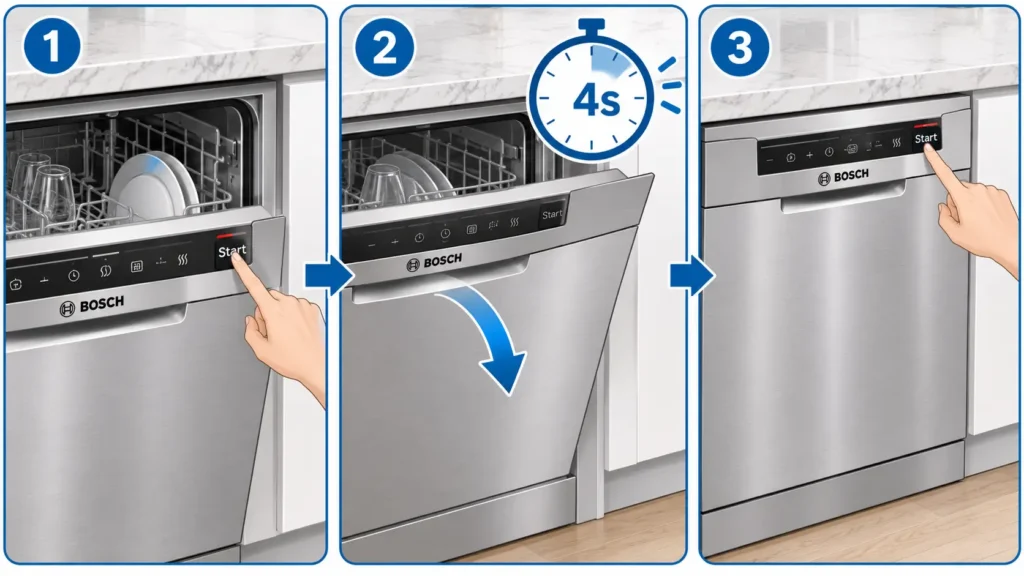
If the light flashes right after you press Start, close the door and press Start once more.
Step 3: Check for a locked or delayed cycle
If the door is latched but the dishwasher still will not start, Bosch’s US troubleshooting page lists these checks:
- Make sure the door is fully latched.
- Deactivate the child lock. Bosch says a child lock can leave the door and controls unresponsive. The steps are in your owner’s manual.
- Look for a delay-start setting. Bosch manuals list an active delay start or child lock as a reason a cycle will not start or fill.
- Unplug the dishwasher for at least 5 seconds, plug it back in and try again.
If it has no power at all, check that the cord is secure, test the outlet with another device and check your home’s breaker panel.
Step 4: Reset the dishwasher
Reset methods differ between models, so use the one in your manual.
| If your manual says | What it describes |
| SHSM63 / SHS863 / SHS843 series | Hold Start for about 3 seconds, wait about a minute for the dishwasher to drain, then press On/Off. |
| SHP78DM5N and SHX65DM5N | With the door open, hold the terminate button for about 4 seconds, then close the door. |
| Several LEDs flashing (SHP78DM5N) | Switch off, unplug or turn off the breaker, wait at least 2 minutes, then restore power. |
For a general power reset, Bosch’s pages give different waiting times, from at least 5 seconds up to about a minute. One manual says at least 2 minutes. Waiting 2 minutes meets all of them.
Step 5: Check the water supply if a warning also shows
A water tap symbol or a “Check water supply” message is a separate fault from the flashing floor light. Bosch’s pages say to:
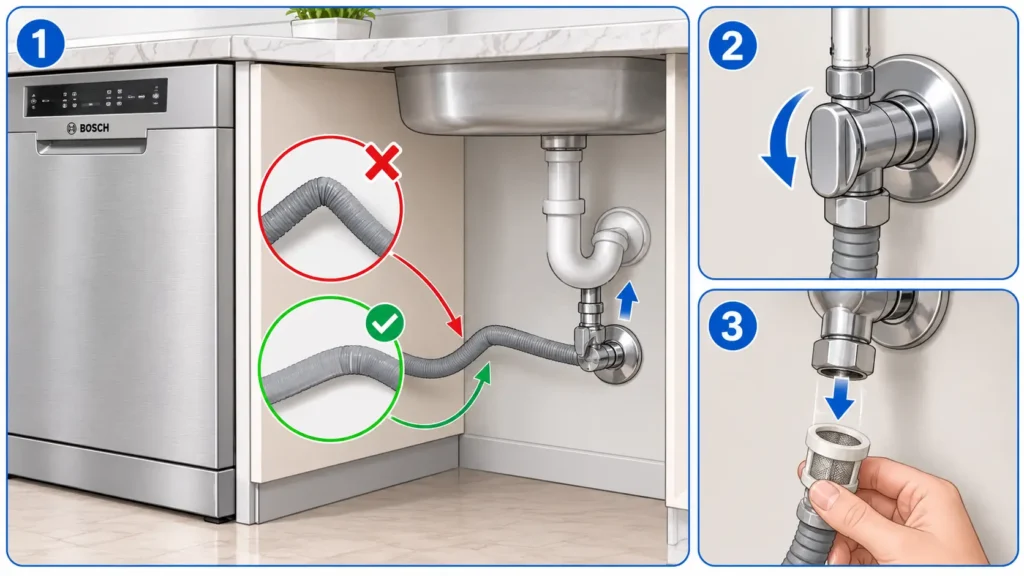
- Look for a kinked or twisted supply hose and straighten it.
- Make sure the water tap is fully open.
- Check that the inlet hose filter is not blocked. Bosch’s Singapore dishwasher page describes cleaning it with the water turned off.
That page gives about 10 litres per minute from the open tap as the expected flow. Bosch says to book a repair if the problem continues.
If an error code is also showing
Bosch’s US error-code page lists these codes. Codes and steps can differ by region and model.
| Code | Meaning on Bosch’s US page | Suggested action |
| E15 / E3100 | Water detected in the base; leak protection active | Turn off the water supply and contact Bosch Support |
| E16, E17 / E3300, E3400 | Water may not be entering | Check the inlet hose for kinks or damage; contact support |
| E18 / E3200 | Water level too low or water not pumped correctly | Check the inlet hose and that the water is on; contact support |
| E22 / E9240 | Filter blocked | Clean the filter under running water with mild soap and a soft brush |
| E23 / E6101 | Drain pump blocked, clogged or faulty | Contact support |
| E24 / E6103 | Drain filter blocked | Check the inlet hose and pump cover; check the disposer plug if one is fitted |
| E27 / E9001 | House power supply too low | Reset at the breaker; if it recurs, have an electrician check incoming voltage |
For most other codes, Bosch says to reset power at the breaker for about 30 seconds and call support if the code returns.
When to stop and call Bosch
Stop troubleshooting and contact Bosch or an authorised service centre if:
- The door still will not latch, or the latch looks broken. Bosch says a damaged latch stops the dishwasher starting and needs professional replacement.
- You see E15 or any sign of water in the base.
- The light keeps flashing after the door, reset and water checks.
- You notice smoke, sparks, a burning smell or water near electrical parts. Stop using the dishwasher and switch it off only if it is safe to do so.
Do not try to bypass the door switch or latch, or open panels. Bosch’s manual says not to attempt to repair the appliance yourself.
In the US, Bosch Customer Support is at 1-800-944-2904. Have your model and serial number ready from the label on the edge of the door. Outside the US, use the contact details on your local Bosch website.
The Userbook is independent and is not affiliated with Bosch. Bosch is a trademark of its owner.
Sources
- Bosch US dishwasher error codes
- Bosch US dishwasher troubleshooting
- Bosch operating instructions, SHSM63/SHS863/SHS843 series
- Bosch operating instructions, SHE89PW55N / SHX89PW55N / SHV89PW53N
- Bosch use and care manual, SHX65DM5N
- Bosch use and care manual, SHP78DM5N
- Bosch Singapore, water tap symbol